Appearance
Wind Zones
A Wind Zone pushes the player while they are inside it. Use it for wind tunnels, updrafts or to guide movement through a section.
How it works
The actor you place in the editor is a placeholder. When your map loads in VHOLUME, the game swaps it for the real wind system.
Properties
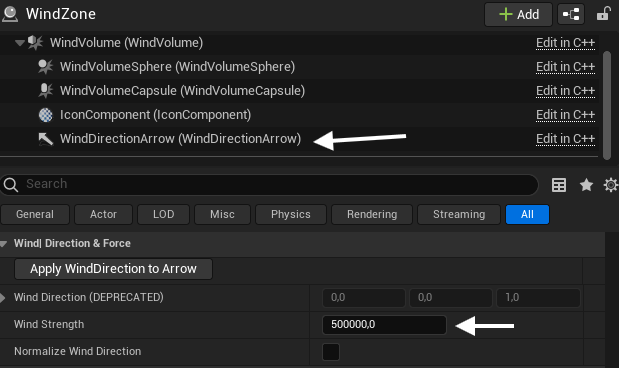
- Apply WindDirection to Arrow - copies the wind direction vector to the visible arrow component.
- Wind Direction (DEPRECATED) - legacy field, kept for compatibility.
- Wind Strength - how hard the wind pushes.
- Normalize Wind Direction - forces the wind direction vector to length 1.
Usage
- Drag a Wind Zone actor into the level.
- Scale the volume to cover the area you want.
- Rotate the actor so the WindDirectionArrow component points the way the wind should blow.
Tips
- Use several small Wind Zones instead of one huge one for finer control.
- Test with VHMap > Play to feel the force in-game.