Appearance
Medal Times
The Medal Times actor gives your map Bronze, Silver, Gold and Author times. Players see them in the map's leaderboard, the same way they see the medal times on the game's own levels. It is optional: a map without one simply has no medals.
Placement
- Find Map Medal Times in the same folder as the other VHOLUME actors (see Where to find them), or type
Map Medal Timesin the Place Actors search. - Drag one into the level. Where it stands does not matter.
- With it selected, open the Medal Times section of the Details panel. It sits below the engine sections, so the quickest way is to type
timein the Details search box. - Type each time in seconds.
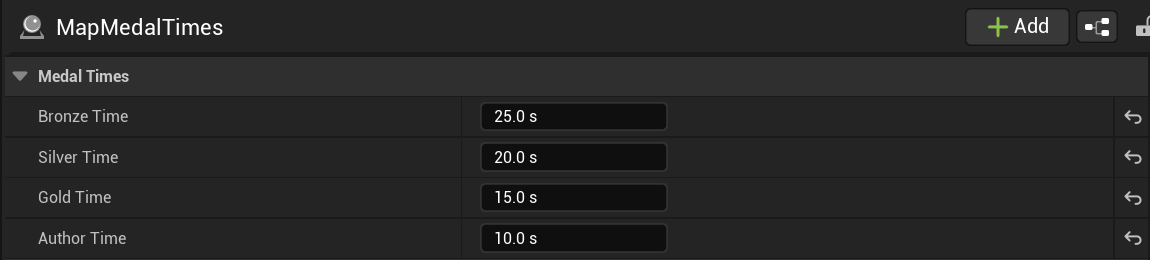
The label above the actor shows your times as m:ss.mmm, so you can check them at a glance.
Properties
| Property | Meaning |
|---|---|
| Bronze Time | Time to beat for Bronze. Required -- without it no medal shows at all. |
| Silver Time | Time to beat for Silver. |
| Gold Time | Time to beat for Gold. |
| Author Time | Your own best time. Players only see it once they beat it. |
Times are in seconds: 83.456 is 1:23.456, 125 is 2:05.000. Leave a time at 0 to skip that medal.
Each medal must be faster than the one before it: Bronze is the slowest, Author the fastest.
Notes
- Use one per map. VHMap warns at packing if there are more.
- Build > Map Check warns if Bronze is missing or the times are out of order.
- Medals have no ghosts on community levels. Clicking a medal time in the leaderboard does not load one.
- Players see the times once they have played your map at least once.
Needs VHOLUME 1.0.1.354 or newer.